- Using this screen
- Details of this screen
Using the ERP Registration Selection screen
Using the ERP Registration Selection screen
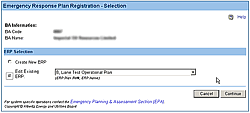
The Emergency Response Plan Registration selection screen. For details click on the Details tab.
The ERP Registration Selection screen lets you make the following selection when preparing an ERP registration:
To create a new ERP registration:
- Select the Create New ERP option.
- Click on the Continue button.
To update a saved, but not submitted, registration:
At any time while preparing an ERP registration, you can save the information you have prepared but not yet submitted. Here is how to return to this form to continue working on it.
- Select the Edit Existing ERP option.
- Select the ERP registration you wish to edit using the drop-down list.
- Click on the Continue button.