- Using this screen
- Details of this screen
Using the ERP Maintenance Selection screen
Using the ERP Maintenance Selection screen
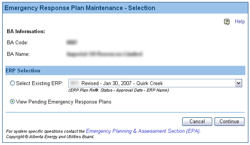
The Emergency Response Plan Maintenance selection screen. For details click on the Details tab.
Submitted: If a plan has a status of Submitted, it means that an EPA analyst has not yet looked at it. You can make changes to this plan registration and then re-submit them. Once the plan has been re-submitted its status will change to Revised.
Revised: If a plan has a status of Revised, it means that the applicant has made changes to a Submitted plan, or, that the applicant has made changes to an Approved plan. You can make changes to this plan registration and then re-submit it. Once the plan has been re-submitted, it will continue to have a status of Revised.
Plan Received: If a plan has a status of Plan Received, it means that an EPA analyst has taken assignment of the registration and that deficiencies have been identified. You can make changes to this plan registration and then re-submit it. Once the plan has been re-submitted, it will have a status of Revised.
The ERP Maintenance Selection screen lets you do the following:
- select an existing ERP to update
- view submitted ERP registrations that are pending review
To select an ERP to update:
- Select the Select Existing ERP option.
- Select the ERP you wish to update using the Select Existing ERP drop-down list.
- Click on the Continue button. The ERP Maintenance Screen opens.
To view your ERPs that are pending:
- Select the View Pending Emergency Response Plans option.
- Click on the Continue button. The Emergency Response Pending List screen opens.