- Using this screen
- Details of this screen
Details of the ERP Maintenance Selection screen
Screen Item Descriptions
|
|
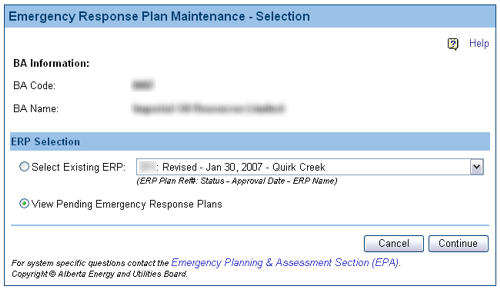
A sample of the Emergency Response Plan Maintenance Selection screen. |
Screen Item Descriptions
Each item on this screen is listed and described below.
- Select Existing ERP option
- Select the Select Existing ERP option to update information for an existing and approved ERP. You will need to select the ERP using the Select Existing ERP drop-down list.
- Select Existing ERP drop-down list
- Click on the Select Existing ERP drop-down list button and select the ERP you wish to update.
- View Pending Emergency Response Plans option
- Select the View Pending Emergency Response Plans option to see a list of ERPs that have statuses of Submitted, Revised, or Plan Received.
- Continue button
- Click on the Continue button once you have made your selection.
If you chose the View Pending Emergency Response Plans option, the Emergency Response Pending List screen will open (shown below).

If you chose the Select Existing ERP option, the Emergency Response Plan Maintenance screen will open.