About Browsers
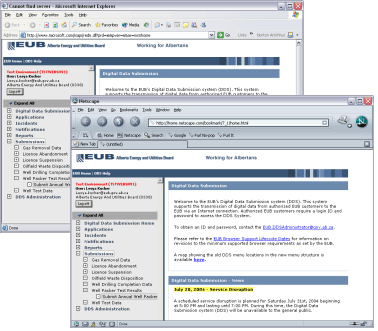
Shown here two of the most popular Browsers displaying a DDS page. Both (Internet Explorer 6 and Netscape Navigator 7) provide good support for the W3C standards and are equally viable for accessing DDS services.
At the ERCB, we try and support the tools you use. However, Internet Browsers have only recently conformed to standards that make this possible. See our ERCB Browser Support Lifecycle Dates page for information on your favourite Browser.
Browsers are not all alike
Browsers, programs like Internet Explorer and Netscape Navigator that we use to view Internet sites, have quite a checkered history. Beginning in 1991 as very simple, text only, devices they have evolved to the highly graphical and interactive programs we use today. Equally as diverse are the methods used by the Browse to present such impressive capabilities. And this is the problem.

 By mid-1997 both Netscape and Microsoft were going head-to-head for the Internet market, and both were marching off in their own direction to make Browsers that would wow us. Each company came up with their own ways of interacting with readers and to present neat looking web-pages. As a result, web-developers had to build web-pages that could sense what Browser you were using and respond appropriately.
Microsoft won.
With Microsoft's release of Internet Explorer 4, they not only delivered an impressive Browser, but one that was less buggy than Netscape Navigator 4, that had more features than Netscape Navigator, was free, and that at least paid lip service to the standards that were being proposed by the World Wide Web Consortium (W3C).
Internet Explorer continued to develop, the W3C continued to propose new standards, Netscape re-wrote their Browser, and of course many other companies developed Browsers (including Opera, Mozilla, and AOL-American On-Line).
the new ones behave the same
Most new Browsers conform to the W3C standards, standards describing how a web-page should be marked-up (HTML and XML, ways to differentiate header text from body text from text in lists etc.), standards describing how to present information on a web-page (CSS, Cascading Style Sheets), standards describing how a web-page can reference information on the page (DOM, Document Object Model), and standards regarding the programming language used by a web-page to interact with the reader (ECMA scripting, European Computer Manufacturers Association scripting-an updated JavaScript). This all means we don't have to customize web-pages for each Browser as we had to do in the past.
|
Avant |
Internet Explorer |
Mozilla |
Mozilla Firefox |
Netscape Navigator |
Opera |


New Browsers like Internet Explorer 6, Netscape Navigator 7, Opera 7, Mozilla Firefox, and others all provide similar support to the W3C standards and we don't care which of these you use. We still provide some support for the older browsers but this means some redundant development work and slower performing web-pages. The sooner we can get away from this the happier we all will be so we now have a Browser support strategy in place. This is a plan for how much longer we will support older Browsers. Since up-to-date versions of most Browsers are a free download, this should be easy for everybody.