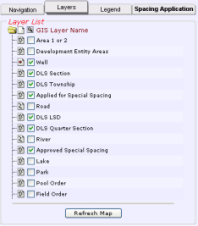
The Layers tab
(click the image for details)
(click the image for details)
Using the Layers tab
The Layers tab provides controls to select the map features to display on the map.
Related map features are grouped into layers. To avoid over-posting, each map layer has a maximum map scale at which it displays. For details on displaying the attributes of wells, fields, pools, and spacing, see Viewing spacing attributes.
To show or hide layers
- Select or clear the check box to the left of the layer name.
- Click Refresh Map below the list of map layers.
The map redraws to include only the selected layers.
The map layers selected appear on the map when you are at the appropriate map scale. For example, roads and lakes start to appear at a scale of 1:160,000.