- Using this screen
- Details of this screen
Using the Report Selection screen
Using the Report Selection screen
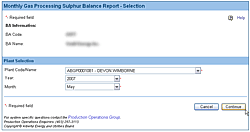
The Report Selection screen. For details click on the Details tab.
The Report Selection screen is used to complete the areas highlighted in yellow from the paper S-30 form shown below.
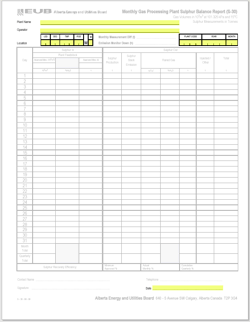
The Report Selection screen lets you select the gas plant and reporting period.
Here's how to use this screen:
You must know the Reporting Facility ID, the year, and month you will be reporting sulphur balance data for before using this screen. The paper S-30 form required you to specify the Plant Name, Operator, Location, and Plant code to identify the facility. All of this has been replaced by simply selecting the Reporting Facility ID.
- Click on the Plant Code/Name drop-down list button and select the Reporting Facility ID of the facility being reported. More on Reporting Facility IDs.
- Reporting Facility ID
- The Reporting Facility ID is an 11-character code that uniquely identifies all reporting facilities. It includes a Province indicator, Facility Type indicator and the Plant code. Here is an explanation of these components.
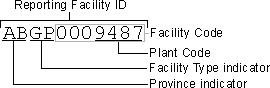
- valid Facility types are:
- CS: Compressor Station
- CT: Custom Treating Plant
- GP: Gas Plant
- GS: Gathering System
- IF: Injection Facility
- PL: Pipeline
- RF: Refinery
- SC: Sulphur Consignee
- TM: Terminal
- WP: Waste Plant
- A complete list of all Reporting Facilities and their IDs is available on the ERCB website at ercb.ca/data/codes/ActiveFacility.txt
- Click on the Year drop-down list button and select the year being reported.
You can only ammend data as far back as January of the previous year.
- Click on the Month drop-down list button and select the month being reported.
- Click on the Continue button. The Plant/Contact Details screen opens.
You have now selected the plant, year and month being reported. If you need to change any of these, use the Browser's Back button to return to this screen.
Your Browser's Back button will look something like this:
 . Note however that any data you have entered, including uploaded data, will be lost if you use the back button.