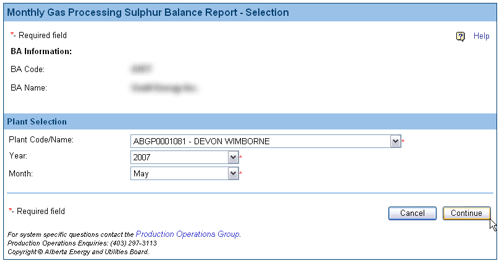
Details of the Report Selection screen
Screen Item Descriptions
Each item on this screen is listed and described below.
- Plant Code/Name
-
Click on the Plant Code/Name drop-down list button and select the Reporting Facility ID of the facility being reported. More on Reporting Facility IDs.
- Reporting Facility ID
- The Reporting Facility ID is an 11-character code that uniquely identifies all reporting facilities. It includes a Province indicator, Facility Type indicator and the Plant code. Here is an explanation of these components.
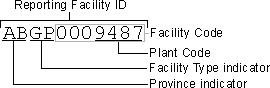
- valid Facility types are:
- CS: Compressor Station
- CT: Custom Treating Plant
- GP: Gas Plant
- GS: Gathering System
- IF: Injection Facility
- PL: Pipeline
- RF: Refinery
- SC: Sulphur Consignee
- TM: Terminal
- WP: Waste Plant
- A complete list of all Reporting Facilities and their IDs is available on the ERCB website at www.ercb.ca/data/facilities/Facility.txt
|
- Year
- Click on the Year drop-down list button and select the year being reported.
- Month
- Click on the Month drop-down list button and select the month being reported.
- Continue button
- Click on the Continue button. The Plant/Contact Details screen opens.
|