- Using this screen
- Details of this screen
Using the Licensee Selection screen
Using the Licensee Selection screen
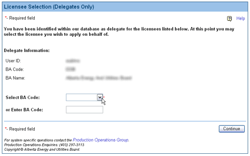
The Licensee Selection screen. For details click on the Details tab.
The Licensee Selection screen allows users, who have been identified as delegates for other licensees, to select the licensee on whose behalf they are acting. This screen only opens when the login id you used to sign onto DDS has a delegate designation.
Selecting the licensee on whose behalf you acting requires you to know the BA Code for that licensee.
To select the licensee on whose behalf you are acting:
- Type the BA code for the licensee in the Select BA Code field.
- Press Enter to verify that the BA Code is
correct. If the BA code is valid, the name of the company will be shown in
the BA Name field.
Alternatively, click on the Search button to open the BA Advanced Search screen to select a BA from a list of BAs that match a set of selection criteria.